How to Send Bulk WhatsApp Messages Without Getting Banned (2026 Guide)
Quick answer: To send bulk WhatsApp messages without getting banned, use the official WhatsApp Business API with Meta-approved templates, opted-in contacts and a gradual warm-up. Unofficial bulk senders get numbers banned within days. Keep your quality rating green and daily limits grow on their own. The rules and a pre-send checklist follow.
To send bulk WhatsApp messages at scale and keep your number alive, use the official WhatsApp Business API with approved templates. Everything else eventually gets the number banned. The prize is worth protecting: India is WhatsApp’s largest market; reports put it above 500 million users.
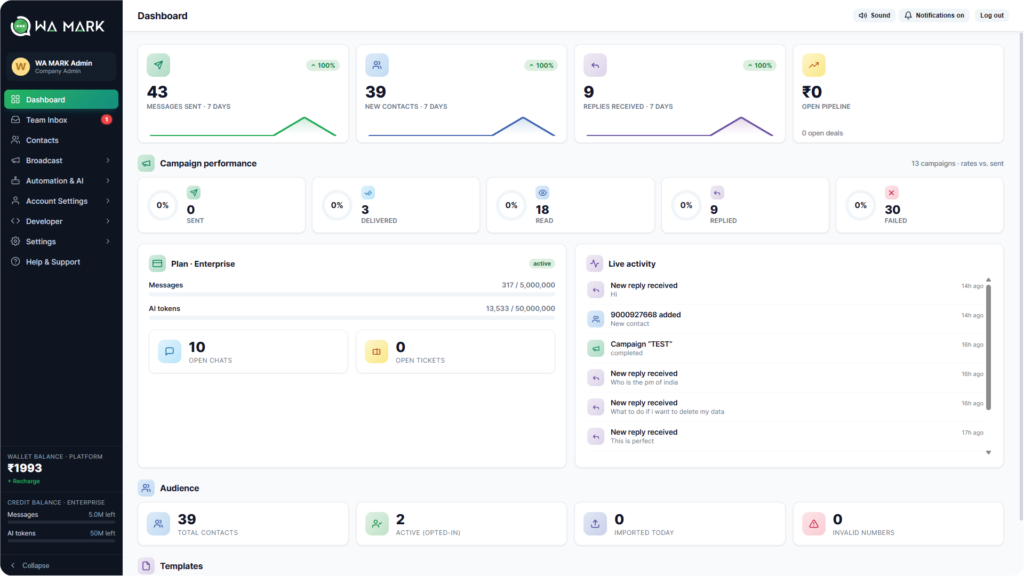
The WaMark dashboard: broadcasts, AI chatbots and a shared team inbox in one place.Every week someone lands in our support inbox with the same story. They bought a “bulk WhatsApp sender” for a few thousand rupees, blasted their customer list on a Sunday night, and by Tuesday their number was banned. The contact list is stuck inside the app, the campaign is dead, and the number their customers have saved for years is gone.Almost every ban we’ve seen comes down to the same 3 mistakes.
Why WhatsApp bans numbers (it’s faster than you think)
WhatsApp watches a handful of signals on every business number:
Block and report rate. If even a small share of recipients tap “Block” or “Report”, your number’s quality rating drops. A few hundred blocks in a day is usually enough for a temporary restriction; keep it up and the ban becomes permanent.
Messaging people who never opted in. Numbers scraped from directories, bought lists, Justdial exports: these recipients don’t know you, so they block you. See point one.
Unofficial tools. Most “bulk sender” software works by automating the regular WhatsApp or WhatsApp Business app through a hacked client. Meta detects these clients, and using one is itself a bannable offence, regardless of what you send.
Volume is missing from that list, on purpose. WhatsApp bans you for sending messages people don’t want, and for using software that pretends to be a phone. Send 50,000 messages people asked for and your rating stays green.
The only safe way to send in bulk: the official API
The WhatsApp Business app caps broadcast lists at 256 contacts, and recipients only get your broadcast if they’ve saved your number. That works for a small shop. At any real scale it collapses.The WhatsApp Business API (also called the Cloud API) is Meta’s official channel for businesses that need volume. It’s the same infrastructure WhatsApp itself runs on, which changes the rules completely:
You start with a limit of 1,000 unique customers per day, and it grows automatically (10,000, then 100,000, then unlimited) as long as your quality rating stays healthy.
Outbound campaigns use message templates that Meta reviews before you can send them. Annoying? Slightly. But it means an approved campaign is, by definition, one Meta considers legitimate.
You get delivery receipts, read receipts and reply tracking per recipient, so you can actually measure a campaign instead of guessing.
Getting access used to require paperwork through a solution provider. Today it takes a Facebook Business account and about 10 minutes; a platform like WaMark connects your number to the official API and gives you the campaign tools, inbox and chatbots on top.
6 rules that keep your quality rating green
1. Only message people who said yes
Any clear yes counts as an opt-in. A customer who messaged you first, ticked a box on your website form, scanned your QR at the counter, or replied to a Click-to-WhatsApp ad: all valid. A contact saved in your phone since 2019 who never agreed to marketing is a block waiting to happen. If you can’t say where the consent came from, don’t send.
2. Send less often than you want to
The fastest way to collect blocks is daily promotions. For most businesses 2 to 4 campaigns a month is the ceiling before recipients get itchy. A sari shop announcing a new collection twice a month keeps a healthy list for years; the same shop pushing “TODAY ONLY!” every morning burns it in weeks.
3. Segment before you send
Sending your full list the same message is lazy, and it shows in the block rate. Split by what people bought, which branch they visit, or how recently they interacted. A 2,000-contact segment that actually cares about the offer beats a 20,000-contact blast every single time, and costs a tenth as much.
4. Write templates like a human
ALL CAPS, 6 emojis, “click now before it’s too late”: these get templates rejected and messages reported. Use the customer’s name, state the offer plainly, and make the next step obvious. One emoji is plenty.
5. Give people a way out
Include a line like “Reply STOP to unsubscribe” and honour it instantly. That line protects your number. Someone who unsubscribes costs you nothing. Someone who can’t find the exit taps Report instead, and that’s a strike against your rating.
6. Warm up new numbers
A fresh number that fires 1,000 messages on day one looks exactly like a spammer. Start with your most engaged customers in the first week, let replies come in (replies are a strong positive signal), then scale up. The daily limit grows on its own when the quality holds.
What it actually costs
Meta charges per template message delivered. In India a marketing template runs at roughly ₹0.78–0.88 per message (check Meta’s current rate card, it changes), utility messages like order updates cost about a tenth of that, and everything you send inside the 24-hour window after a customer messages you is free.On top of Meta’s fees you pay your platform’s subscription. We’ve broken the whole thing down, with worked examples for a typical small business, in our WhatsApp Business API pricing guide.
The pre-send checklist
Pin this somewhere. Before every campaign:
Every recipient opted in, and you know where the consent came from
The segment actually matches the offer
Template approved, personalised, one emoji max, no ALL CAPS
“Reply STOP to unsubscribe” included, and the automation to honour it is on
You haven’t messaged this segment in the last week
Someone is staffing the inbox for replies (a campaign that gets replies and answers them is gold for your quality rating)
Common questions
Can I use my existing WhatsApp number on the API?
Yes, but it has to move: a number can’t run the regular app and the API at the same time. Most businesses either migrate their main number or take a new one for campaigns and keep the old one for personal use.
How many messages can I send per day?
New API numbers start at 1,000 unique customers per 24 hours. Maintain a good quality rating and Meta raises it automatically. Most active senders reach 10,000 within a couple of weeks, and 100,000 after that.
Is the green tick included?
No. The verified badge is a separate application to Meta, and they’re selective about it. You can send at full scale without it; the badge mostly buys customer trust.
What happens if my quality rating drops?
You’ll see it flagged (WaMark surfaces it on your dashboard) and your daily limit can be reduced. Pause campaigns for a few days, let organic conversations recover the score, then restart with your most engaged segment.The risk in bulk WhatsApp lives in the shortcuts. Use the official API, message people who want to hear from you, and the channel will outperform email and SMS by an embarrassing margin. If you want to see what that looks like for your business, WaMark plans start at ₹999/month, billed in INR via Razorpay with automatic GST invoices. Yearly billing saves about 2 months.
The safe way to send bulk WhatsApp messages in 2026
The playbook in one line: send bulk WhatsApp messages through the official WhatsApp Business API, with approved templates, clean opt-ins, a gradual warm-up and a close eye on your quality rating. Numbers that follow it scale for years. Numbers that skip a step end up in our support inbox by Tuesday.
How to send bulk WhatsApp messages safely: FAQs
What is the safest way to send bulk WhatsApp messages?
The only safe way to send bulk WhatsApp messages at scale is the official WhatsApp Business API with pre-approved templates and opted-in contacts. Unofficial bulk-sender apps get numbers banned.
Can I send bulk WhatsApp messages for free?
Replies inside Meta’s 24-hour service window cost nothing, but to send bulk WhatsApp messages as marketing you pay Meta per template conversation, roughly ₹0.78 in India at the time of writing.
How many can I send per day?
Your daily limit to send bulk WhatsApp messages depends on your number’s messaging tier, which scales from 1,000 to unlimited as your quality rating stays high.
We use cookies and similar technologies to collect and process information about your use of this website — to improve the site, tailor our marketing and give you a more personalised experience. Choose “Accept” to consent, or “View preferences” to decide per category.
Functional
Always active
The technical storage or access is strictly necessary for the legitimate purpose of enabling the use of a specific service explicitly requested by the subscriber or user, or for the sole purpose of carrying out the transmission of a communication over an electronic communications network.
Preferences
The technical storage or access is necessary for the legitimate purpose of storing preferences that are not requested by the subscriber or user.
Statistics
The technical storage or access that is used exclusively for statistical purposes.The technical storage or access that is used exclusively for anonymous statistical purposes. Without a subpoena, voluntary compliance on the part of your Internet Service Provider, or additional records from a third party, information stored or retrieved for this purpose alone cannot usually be used to identify you.
Marketing
The technical storage or access is required to create user profiles to send advertising, or to track the user on a website or across several websites for similar marketing purposes.